Free trial
Menu

Spellex Write-Assist Reading and writing help, right inside Word and Google Docs

Spellex Write-Assist finds the spelling mistakes other spell checkers miss, especially words spelled the way they sound. It checks easily confused words, reads your writing aloud, and shows your document in a font and colors that are comfortable to read.

No account to create. Your documents are not sent to Spellex.

Word for WindowsWord for MacWord on the webGoogle Docs · coming soon
The Spellex Write-Assist pane beside a student's essay. The misspelled word becuz is selected in the document, and the pane suggests because under Sounds like.

See it in 50 seconds

Check spelling by sound, sort out their, there and they're, hear your writing read aloud, switch to a dyslexia-friendly Reading View, and write out medical abbreviations.

The video has captions and no sound.

What makes Spellex different

Inside the document

The Spellex pane sits beside your work in Word or Google Docs. There is no separate app to switch to.

Spelling by sound

"Sounds like" suggestions find the word you meant from how it sounds: fone for phone, becuz for because.

Homophones checked

Their, there or they're? Spellex shows each one in context with what it means, so you pick the right word.

Your field's vocabulary

Medical, bioscience, legal and veterinary dictionaries are part of the spell checker, in US or UK spelling.

One tool, one thing to learn

Spelling, reading aloud, Reading View, word lists and readability, all in the same pane.

Private by design

Your writing is checked on your own computer or browser. No account, no sign-in, and documents are not sent to Spellex.

Everything in one pane

Open Spellex from the Spellex tab in Word, or from the Extensions menu in Google Docs. Choose a tool at the top of the pane.

Check Spelling

Finds the words other spell checkers miss

Click Check Document. Spellex selects each misspelled word in your document and shows its suggestions. Under Sounds like it lists real words that sound like what you typed.

becuz → because  ·  fone → phone  ·  enuf → enough  ·  nite → night

  • Hear any suggestion before you choose it
  • Change, Change All, Ignore, or Add to My Words
  • Check one word you are not sure about with Check Selected Word
  • US, UK, Canadian and Australian English
Check Spelling: the word becuz with suggestions, and because under Sounds like.
Homophones

Their, there or they're? Spellex asks

A spell checker accepts homophones because each one is a real word. Spellex lists them in your document, shows each one in context with what it means, and offers the words that sound the same.

  • See the meaning of every choice
  • Hear each word read aloud
  • One click to change it, or Keep It
Homophones: the word there is selected in the essay, and the pane offers their (belonging to them) and they're (they are).
Read Aloud

Hear your writing, word by word

Hearing your sentences is one of the best ways to catch mistakes. Spellex reads your selection or the whole document, highlighting each word as it is spoken.

  • Choose the voice and the speed
  • Pause, resume and stop at any time
  • Say the Sentence I Just Wrote while you type
  • Uses your computer's own voices: free, and works offline
Read Aloud: the first paragraph is read aloud, with the word realise highlighted in the pane.
Reading View

Read in the way that suits you

The Reading View shows your document in the font, size, spacing and colors you choose, without changing the document. One click sets a profile.

  • Dyslexia-Friendly Reading: the DysLex font, comfortable spacing, a cream page
  • Visual Stress: spacious text on a soft blue page, with line focus
  • Low Vision: large, spacious text
  • Read aloud with each word highlighted, or open it in a larger window

The DysLex font comes with Spellex: nothing to install.

Reading View with the Dyslexia-Friendly Reading profile: the essay in the DysLex font on a cream page.
Dyslexia-Friendly Reading
Reading View with the Visual Stress profile: spacious text on a soft blue page.
Visual Stress
MedXpand and specialist dictionaries

Made for medical writing

Type a medical abbreviation code ending with a slash and Spellex writes it out: a.o/ becomes alert and oriented, sob/ becomes shortness of breath. Expand every code in a document at once, or search for a code by its meaning.

  • Over 5,000 medical abbreviation codes
  • A capital at the start of a sentence: F.u/ becomes Follow-up
  • Spellex Medical, Bioscience, Legal and Veterinary dictionaries, in US or UK spelling
  • Checks words in CAPITALS, such as medication names

MedXpand is a writing aid: always check expanded abbreviations against your organization's approved list.

MedXpand: an admission note with every code written out, and the code finder listing codes for allergies.
Word Bank

Your own words, with their meanings

Keep a list of new words, course terms or words you often misspell. Spellex looks up each meaning for you. Hear a word, insert it into your document, or practice spelling it.

  • Practice Spelling: Spellex says a word, you type it, it checks
  • Print or save your list
  • Add any word from Definition with one click
The Word Bank with four words and their meanings.
Your Word Bank
Practice Spelling: the answer goverment is checked and Spellex shows the right spelling, government.
Practice Spelling
Readability

How easy is your text to read?

Spellex rates your document or selection in plain words, from "Easy to read" to "Very hard to read", with a reading level. It lists your long sentences and harder words, so you know what to simplify.

  • Click a long sentence to go to it
  • Click a harder word to see what it means
  • Useful for patient letters, reports and assignments
Readability: Plain English, most adults read it easily, US grade 7, with one long sentence of 45 words.
Definition

What does this word mean?

Select a word in your document and open Definition: Spellex shows its meanings, how to say it, and examples. Click the speaker to hear it, or add it to your Word Bank.

Definition: the word memory selected in the essay, with its pronunciation and meanings.
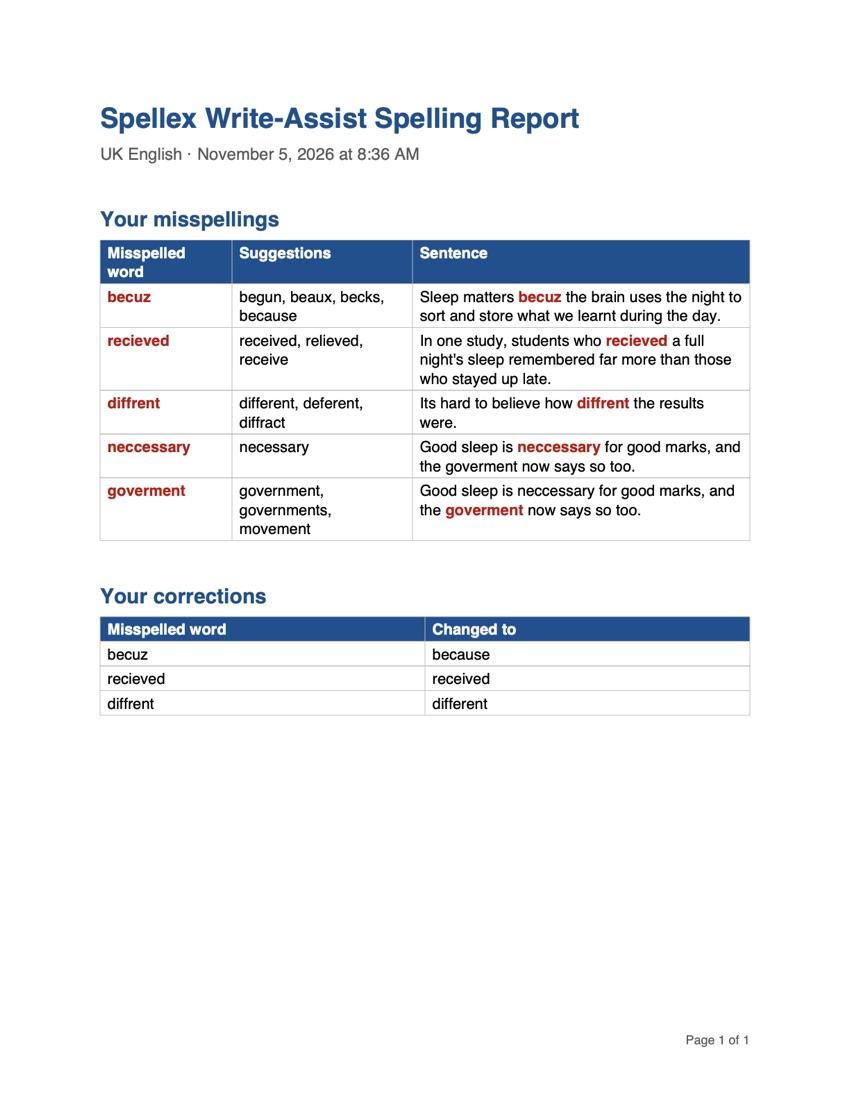
Spelling Report

See which words you misspell most

The Spelling Report lists the words you misspelled, with suggestions and the sentence where each was found, and the corrections you made. Students and tutors use it to choose which words to practice.

  • The misspelled word highlighted in its sentence
  • Save or print it
A Spelling Report listing five misspelled words with suggestions and their sentences, and three corrections.

Who it's for

Students

College and university students, and anyone with dyslexia or other reading and writing difficulties, working on assignments in Word or Google Docs.

Adults at work

Write emails, reports and letters with confidence, and check how easy they are to read.

Medical staff

Medical dictionaries, MedXpand abbreviation codes and medication names in capitals, for clinical notes and letters.

Schools and employers

IT can install Spellex for everyone from the Microsoft 365 admin center, and from the Google Admin console when the Google Docs version is available.

Where it works

Spellex Write-AssistWhat you needGood to know
for Word on WindowsMicrosoft Word for WindowsAlso changes the look of the document itself: Zoom Ruler, Line Focus, Color Overlay, the DysLex font and text spacing, and Read As I Type for each word and sentence.
for Word on Mac and the webWord for Mac with Microsoft 365, or Word on the web in a current browserAdds Readability, Practice Spelling and Check words in CAPITALS. The Reading View gives the reading profiles, line focus and page colors.
for Google DocsA Google account and Google Docs in a current browserComing soon. Your settings, own words and Word Bank are saved in your Google account and follow you to any computer.

An internet connection is needed to start Spellex and to look up definitions. Checking spelling and reading aloud run on your computer.

Try it, then license it

Every tool is free for 15 days from the first time you open Spellex. No account and no card needed.

Free trial

15 days, every tool

Starts the first time Spellex opens. A reminder shows how many days are left.

Perpetual license

Buy once, keep it

A product key with no end date. Enter it once in Settings and click Activate.

Annual license

One year, renewable

A year from the day the key is issued. Spellex reminds you 30 days before it ends, and a renewal starts a new year.

Perpetual licence, one user: $79

Want specialist dictionaries in the spell check of every Microsoft Office app too? The Spellex Spelling Suite adds Spellex Spell Checker, for $99.

Licenses for more users, schools and employers: call 1-813-792-7000 (US) or +44 161 802 0200 (UK), or contact us.

Free technical support, for the life of the product

Included with every license: no support plan to buy, and no expiry date.

Call a real person

Speak to someone who knows Spellex, not a phone menu. US: 1-813-792-7000 · UK: +44 161 802 0200

Live chat

Chat with our team from www.spellex.com.

Remote session

Book a free session: our engineers fix the problem hands-on, on your computer. Or open a ticket at spellex.com/support.

Questions

Does Spellex replace Word's own spell check?

No, it works beside it. Word or Google Docs still underlines mistakes as usual; Spellex adds Sounds like suggestions, homophones, read aloud and the other tools in its pane.

Does Spellex change my document?

Only when you ask it to, for example when you click Change, Expand All Codes or Insert. The Reading View shows your document in another font and colors without changing it.

Is my writing sent over the internet?

No. Spellex checks your writing on your own computer or in your browser, and your documents are not sent to Spellex. Only a word you look up is sent to a dictionary service, and your product key is sent to Spellex to check it. Read the privacy policy.

In Google Docs, what can Spellex see?

Only the document you open it in. Spellex asks for Google's narrowest permission, so it never sees your other files, your Drive or your email.

What happens when the trial ends?

The tools are locked until you enter a product key. Buy one at www.spellex.com or call 1-813-792-7000, then enter it in Settings and click Activate.

Can my school or company install it for everyone?

Yes. Microsoft 365 administrators can deploy Spellex for Word to all users, and Google Workspace administrators will be able to install the Google Docs version for everyone. Contact us for multi-user licenses.

Which languages does it check?

US, UK, Canadian and Australian English, with specialist dictionaries in US or UK spelling.

Write and read with confidence

Try Spellex Write-Assist free for 15 days, with every tool.